
Working with an Uploaded Plugin
Once you have uploaded the plugin, you can edit its properties, and use it as part of the Plugin Step.
To Edit an Existing Plugin:
- Select Plugin> {Specific Plugin} in the Navigation Pane.
- In the Work area, click the name of the plugin to edit. The Plugin page opens.
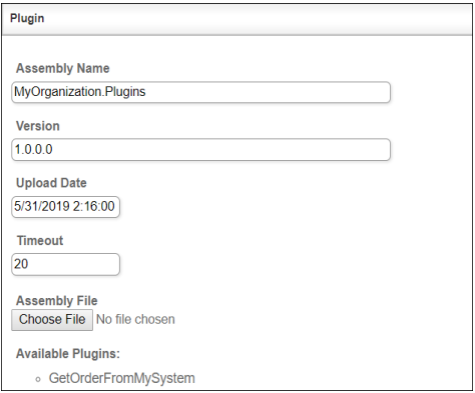
A New Plugin Page
| Field | Description |
|---|---|
| Assembly Name | The Plugin Assembly name. |
| Version | The Plugin version. |
| Upload Date | The date this plugin was uploaded to the IConduct platform. |
| Timeout | The length of time (in milliseconds) the IConduct platform waits for a Plugin execution before returning a timeout error. Set the time value to stop the system from execution attempts. |
| Assembly File | Allows you to Choose File of the new version of this plugin assembly. |
| Available Plugins | Enumerates the plugins available in the assembly file. |
- On the toolbar click Save & Close once done.